

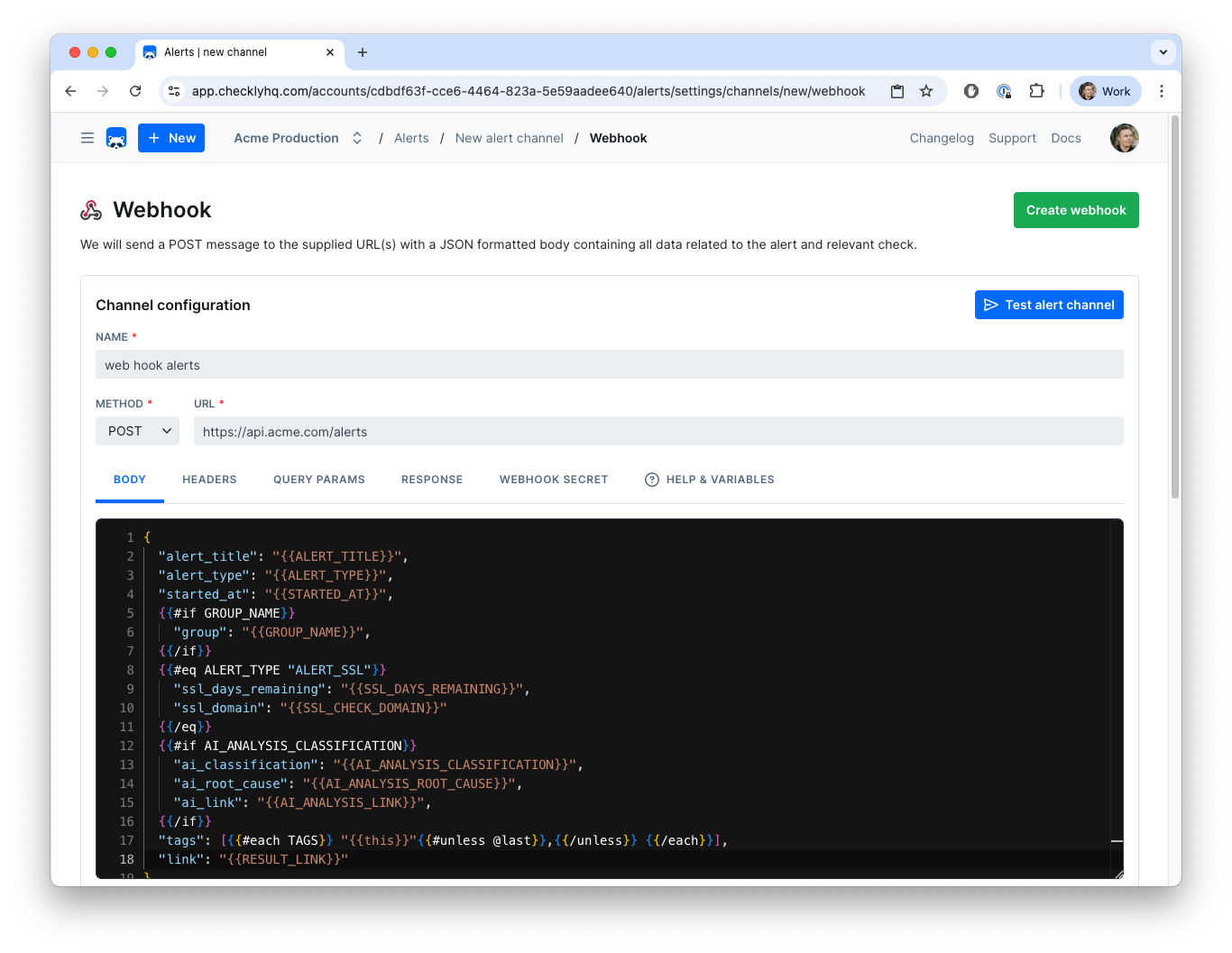
- Create a custom URL by adding in authentication tokens or other secrets.
- Create a custom payload body using any environment variables and specific instance variables per event. Note: that means that if you are attaching the webhook to a Group, you will be able to access Group-level variables, too.
- Debug and test the webhook in the editor by sending test messages.
Using Variables
The example above shows a webhook configured to create a Jira ticket on each event. Notice the following:- We use the variable
JIRA_INSTANCE_URLin the URL. We previously stored this variable in the environment variables section. Alert-channel configurations accept both environment variables and secrets using the same{{NAME}}syntax. - We use the variable
CHECK_IDin the payload. This is one of many event-based variables that will change with each call. See below for the complete list.
{{ }} to insert the variable.
To avoid encoding, you can access your environment variables with triple brackets, i.e.
{{{USER_API_KEY}}}{{CHECK_NAME}} a double quote arrives as ", with {{{CHECK_NAME}}} as \"; a line break arrives as \n in both cases.
Using environment variables and secrets in this channel’s configAny literal-secret field in this alert channel — webhook URL, API key, bearer token, service key, etc. — accepts a variable or secret reference using the familiar Handlebars syntax:
{{MY_VARIABLE}}.You can also promote a value to a secret directly from the field: type the literal value, click the lock icon next to the input, and choose a name. The value is stored as an encrypted account secret and is never re-displayed in the UI.Using AI analysis data in alerts
When automatic Rocky AI analysis is enabled, you can include AI-generated root cause and user impact data in your webhook payloads. Use{{#if}} guards so the payload works whether AI analysis data is available or not.
Handlebars Helpers
Webhook templates support Handlebars built-in helpers, such asif, unless, and each, as well as these Checkly helpers:
Get a value from a tag
UsetagValue when your tags store key-value metadata. Given these tags:
payments. Both : and = separators are supported. If neither team:... nor team=... exists, the template renders the fallback UNKNOWN. If multiple tags match, Checkly returns the first one.
Format dates and times
Thedate and moment helpers support Day.js-compatible format tokens. You can format the current time, an absolute date, or relative phrases such as yesterday, 2 days ago, and last week.
{{date "YYYY-MM-DD"}}formats the current date, for example as2026-07-24.{{date "2026-07-24" "MMMM DD, YYYY"}}rendersJuly 24, 2026.{{moment "2 days ago" "YYYY-MM-DD"}}formats the date from two days ago.{{moment "last week" "X"}}formats last week as a Unix timestamp.
Compare values
Use comparison helpers as blocks or subexpressions where applicable. Available helpers include:- Equality and ordering:
eq,is,isnt,gt,gte,lt,lte, andcompare. - Boolean logic:
and,or,not,neither,isTruthy, andisFalsey. - Value checks:
contains,has, anddefault. - Numeric conditions:
ifEven,ifOdd, andifNth. - Inverse comparisons:
unlessEq,unlessGt,unlessGteq,unlessLt, andunlessLteq.
{{#eq}} helper to execute the logic
If the ALERT_TYPE variable equals ‘ALERT_FAILURE’, print ‘DOWN’, if it equals ‘ALERT_RECOVERY’ print ‘UP’
So in the case of a failure event, the body would render to:
- You only need to create one webhook to inform a 3rd party system.
- You can translate Checkly terms to your 3rd party tool’s term for the same concept, i.e. the “up status” of a check.
Webhook Secrets
You can validate each webhook we deliver to your endpoint(s). Using the optional webhook secret, you can:- Check if the webhook was sent by Checkly.
- Check if the payload was not altered in any way during transmission.
x-checkly-signature contains the HMAC-SHA256 of the raw request body, keyed with your secret and hex-encoded. The signature covers the exact bytes we send, for JSON and plain text bodies alike.
On the receiving end, compute the same HMAC over the raw request body, before parsing it, and compare it with the x-checkly-signature header to assert the validity and authenticity of the webhook and its payload. Parsing and re-serializing the body can change its bytes and break the comparison.
Have a look at the code examples below on how to use the header and your favourite web framework.
Webhook Retries
Checkly will retry your webhook up to 5 times if the request fails, for example with an HTTP response higher than 399 (such as a 404 or 503), a network error, or no response within 5 seconds. Retries back off exponentially: 10, 20, 40, 80 and 160 seconds, about 5 minutes in total. This means that for checks on a 1 minute schedule, there is a potential overlap between a failure alert and recovery alert. For this reason every webhook we send has a timestamp in thex-checkly-timestamp header. You can use this timestamp on the receiving end to ignore any webhooks that come in “late”.
Webhook Examples
The following examples give an idea how to integrate Checkly with 3rd party alerting and issue tracking systems.Opsgenie and Jira Service Management
Checkly has no dedicated Jira Service Management (JSM) alert channel. JSM Operations accepts the same alert body as the Opsgenie alerts API, so the webhook below works for both. For JSM, create an API integration in JSM Operations, POST tohttps://api.atlassian.com/jsm/ops/integration/v2/alerts, and send the integration’s key in the Authorization: GenieKey {{JSM_API_KEY}} header.
You can create an Opsgenie
alert by POST-ing the following body
alerts API endpoint
CHECK_GROUP_TEAM variable with a different value for each Group, then modify the above snippet with the following:
PagerDuty
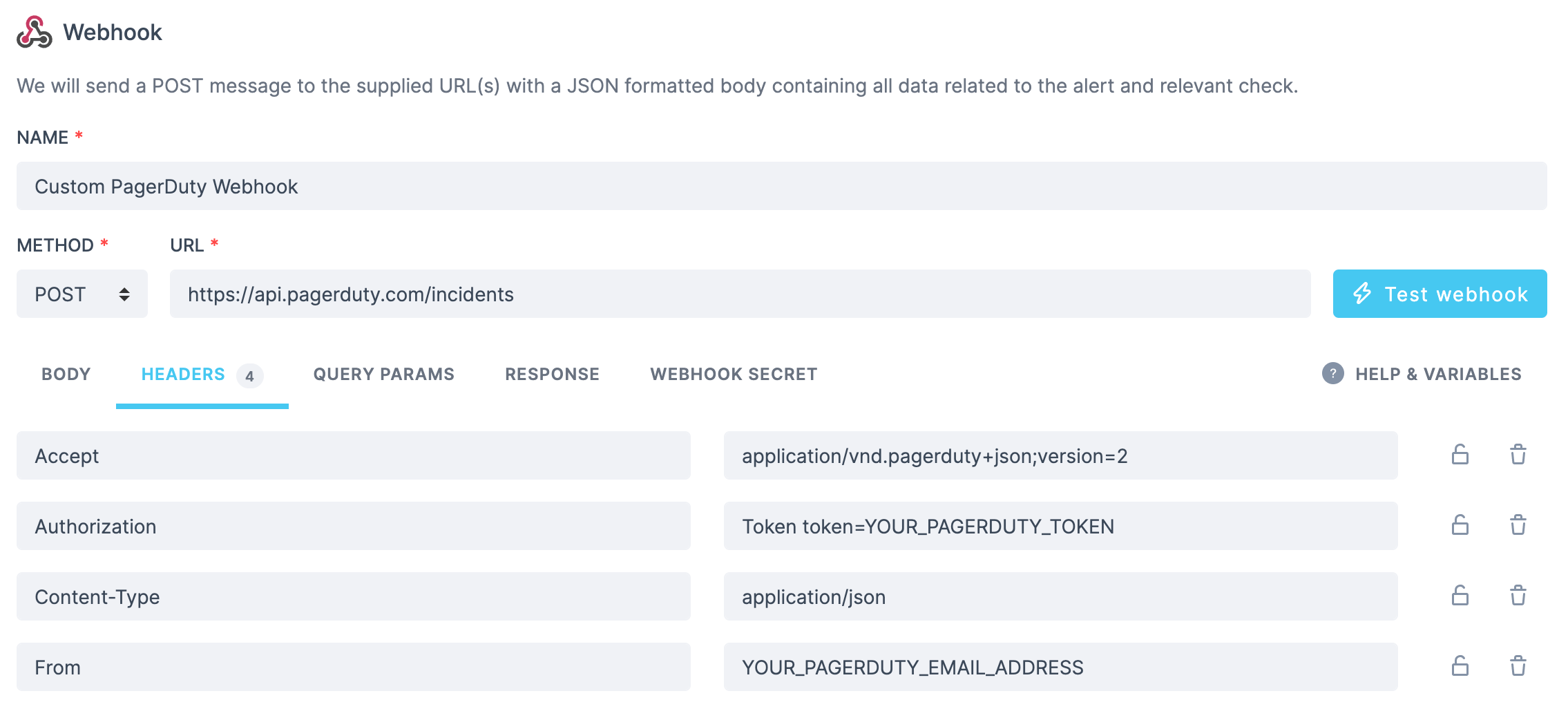
Given an existing service on your PagerDuty account, create an incident for it by posting the following bodyhttps://api.pagerduty.com/incidents. You will need to set the following headers:
Pushover
Send a message using Pushover by posting this body:Trello
You can create a Trello card using just the URL and no payload:SSL alert
You can send your SSL alerts using webhooks. Using the following body:ALERT_TITLE to include the domain and the days remaining till your certificate expires.
Twilio
You can configure a webhook to POST to a JavaScript snippet running in a Twilio Function. This code receives the Checkly webhook JSON, then triggers a Twilio “Flow execution”:Jira
A webhook can be used to create a new issue on Jira via the Jira API, for example in the case of a previously passing check that switches to failing state. We will be creating a POST request to{{JIRA_INSTANCE_URL}}/rest/api/3/issue, where the content of your JIRA_INSTANCE_URL environment variable would look something like https://your-jira-instance-name.atlassian.net.
The required headers will be:
{{JIRA_INSTANCE_URL}}/rest/api/2/issue). The only difference is that version 2 does not support Atlassian Document Format (ADF).