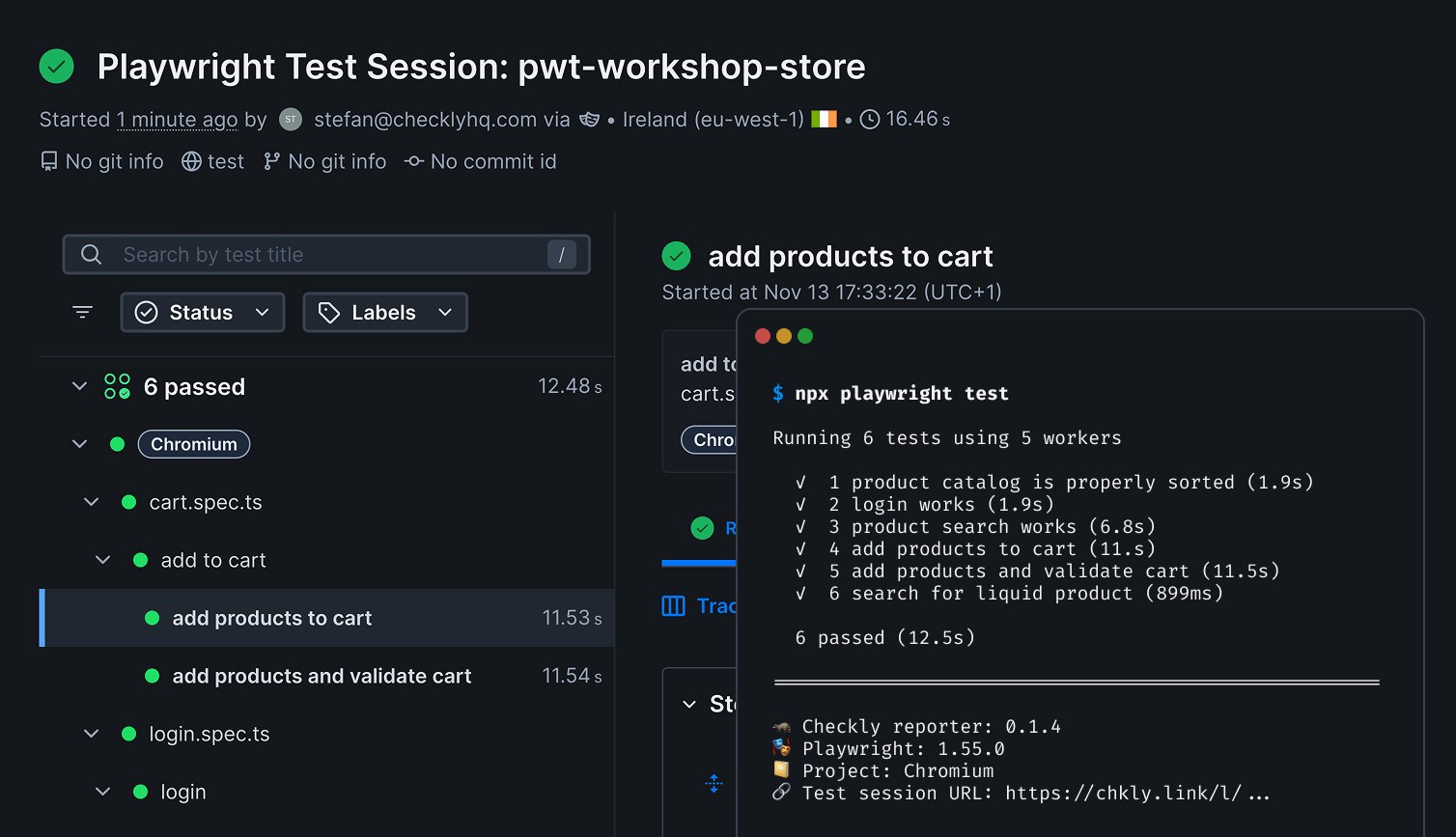
Integrate Playwright test results with Checkly monitoring. Upload test results, screenshots, videos, and traces to gain visibility into your application’s health across test runs.
Fully compatible with Playwright’s native JSON reporter - use it as a drop-in replacement that adds Checkly integration.
Before using the Playwright reporter, ensure you have:
Node.js >= 18.0.0
Playwright >= 1.40.0
A Checkly account (sign up )
Install the Playwright Reporter
Install the Playwright reporter package via npm.
npm install --save-dev @checkly/playwright-reporter
Quick Start
1. Create an API key and get your Account ID
Authenticate the reporter with your Checkly Account ID and an API Key:
Log in to Checkly
Get your Account ID from Account Settings > General
Create an API key in User Settings > API Keys
Set your credentials as environment variables:
export CHECKLY_API_KEY = cu_123 ...
export CHECKLY_ACCOUNT_ID = b2f ...
The reporter automatically detects CHECKLY_API_KEY and CHECKLY_ACCOUNT_ID environment variables.
Use inline environment variables if needed: CHECKLY_API_KEY = ... CHECKLY_ACCOUNT_ID = ... npx playwright test
2. Add the reporter to your Playwright configuration
import { defineConfig } from '@playwright/test' ;
import { createChecklyReporter } from '@checkly/playwright-reporter' ;
export default defineConfig ({
reporter: [
[ 'list' ],
createChecklyReporter (),
] ,
}) ;
createChecklyReporter() provides full IntelliSense for configuration options. Alternatively, use array syntax: ['@checkly/playwright-reporter', {}]
3. Run your tests
You’ll see real-time test progress and a session URL in the output:
Running 5 tests using 5 workers
View test results: https://app.checklyhq.com/test-sessions/abc123
✓ 1 [chromium] › tests/login.spec.ts:4:7 › login › login works (1.9s)
✓ 2 [chromium] › tests/products.spec.ts:14:7 › products › catalog loads (1.9s)
✓ 3 [chromium] › tests/cart.spec.ts:4:7 › cart › add to cart (6.8s)
Project Total Pass Fail Flaky Skip Rate
chromium 3 3 0 0 0 100.00%
🦝 Checkly Reporter v1.3.0 • 🎭 Playwright v1.57.0
📁 3 files • 10.6s
Configuration
Reporter Options
import { defineConfig } from '@playwright/test' ;
import { createChecklyReporter } from '@checkly/playwright-reporter' ;
export default defineConfig ({
reporter: [
[ 'list' ],
createChecklyReporter ({
// Directory for assets, JSON, and ZIP output
outputDir: 'test-results' ,
// Custom session name (string or function)
sessionName: 'My Test Suite' ,
// or: sessionName: () => `Build ${process.env.BUILD_NUMBER}`,
// Skip upload, create local files only
dryRun: false ,
// Enable debug logging
verbose: false ,
// Show real-time test progress
showProgress: true ,
// Show individual test steps
printSteps: false ,
// Show per-project summary table
showSummaryTable: true ,
}),
] ,
}) ;
Option Type Default Description outputDirstringPlaywright’s outputDir Directory for output files sessionNamestring | functionAuto-generated Custom session name or function returning name dryRunbooleanfalseSkip upload, create local files only verbosebooleanfalseEnable debug logging showProgressbooleantrueDisplay real-time test progress printStepsbooleanfalseDisplay individual test steps showSummaryTablebooleantrueDisplay per-project results table
Output files (written to outputDir):
checkly-report.json - JSON test report
checkly-report.zip - ZIP archive with report and assets
Environment Variables
Variable Description CHECKLY_API_KEYYour Checkly API key CHECKLY_ACCOUNT_IDYour Checkly account ID CHECKLY_REPORTER_VERBOSESet to true for detailed debug output
Security Note : Always use environment variables for credentials. Never commit API keys to version control.
What Gets Uploaded
Test results and status (passed/failed/flaky)
Execution duration and timing
Screenshots (on failure or explicit capture)
Video recordings
Playwright traces
Console logs and network requests (extracted from traces)
Git information (branch, commit, author) - automatically detected from CI or local git
If your Checkly reports don’t include traces or videos, ensure that your playwright.config.ts enables these Playwright features. The reporter only uploads what your Playwright test run creates.
Understanding Test Sessions
The reporter creates suite-level test sessions , not individual test file results.
When you run npx playwright test:
One test session is created for the entire run
All test results are grouped together
All assets uploaded in a single ZIP file
This provides a consolidated view of your test suite, efficient storage, and the ability to track overall pass/fail rates over time.
View your results at app.checklyhq.com/test-sessions .
Features
Real-time Test Progress
Shows test results as they run with status icons and error details. Similar to Playwright’s list reporter with Checkly integration.
Set showProgress: false when using another reporter for terminal output.
Summary Table
Displays a summary table with per-project breakdown of test results. Set showSummaryTable: false to disable.
Project Total Pass Fail Flaky Skip Rate
chromium 10 9 0 1 0 90.00%
firefox 10 10 0 0 0 100.00%
webkit 10 8 2 0 0 80.00%
Multi-Provider Git Detection
Automatically detects git information (branch, commit, author) from:
GitHub Actions, GitLab CI, CircleCI, Travis CI
Jenkins, Azure DevOps, Bitbucket Pipelines
Local git repository (when running locally)
Test Step Code Snippets
Includes source code context in test step reports. View the exact line of code that executed with surrounding context for easier debugging.
Dry Run Mode
Skip uploading to Checkly while still generating local files:
Without credentials (automatic skip):
# Don't set CHECKLY_API_KEY or CHECKLY_ACCOUNT_ID
npx playwright test
With dryRun option (explicit skip):
createChecklyReporter ({
dryRun: true ,
})
Upload only in CI :
createChecklyReporter ({
dryRun: ! process . env . CI ,
})
Both approaches create checkly-report.json and checkly-report.zip in your output directory for local inspection.
CI/CD Integration
GitHub Actions
GitLab CI
CircleCI
name : Playwright Tests
on : [ push , pull_request ]
jobs :
test :
runs-on : ubuntu-latest
steps :
- uses : actions/checkout@v4
- uses : actions/setup-node@v4
with :
node-version : 20
- name : Install dependencies
run : npm ci
- name : Install Playwright browsers
run : npx playwright install --with-deps
- name : Run Playwright tests
env :
CHECKLY_API_KEY : ${{ secrets.CHECKLY_API_KEY }}
CHECKLY_ACCOUNT_ID : ${{ secrets.CHECKLY_ACCOUNT_ID }}
run : npx playwright test
Set up secrets:
Go to your GitHub repository settings
Navigate to Settings > Secrets and variables > Actions
Add CHECKLY_API_KEY as a repository secret
Add CHECKLY_ACCOUNT_ID as a repository secret
test :
image : mcr.microsoft.com/playwright:v1.57.0-jammy
stage : test
script :
- npm ci
- npx playwright test
variables :
CHECKLY_API_KEY : $CHECKLY_API_KEY
CHECKLY_ACCOUNT_ID : $CHECKLY_ACCOUNT_ID
Set up variables:
Go to your GitLab project settings
Navigate to Settings > CI/CD > Variables
Add CHECKLY_API_KEY (enable “Mask variable”)
Add CHECKLY_ACCOUNT_ID (enable “Mask variable”)
version : 2.1
jobs :
test :
docker :
- image : mcr.microsoft.com/playwright:v1.57.0-jammy
environment :
CHECKLY_API_KEY : $CHECKLY_API_KEY
CHECKLY_ACCOUNT_ID : $CHECKLY_ACCOUNT_ID
steps :
- checkout
- run : npm ci
- run : npx playwright test
Set up variables:
Go to your CircleCI project settings
Navigate to Project Settings > Environment Variables
Add CHECKLY_API_KEY (automatically masked)
Add CHECKLY_ACCOUNT_ID
Multiple Reporters
Combine with other Playwright reporters:
import { createChecklyReporter } from '@checkly/playwright-reporter' ;
export default defineConfig ({
reporter: [
createChecklyReporter (),
[ 'html' , { outputFolder: 'playwright-report' }],
[ 'list' ],
[ 'junit' , { outputFile: 'test-results/junit.xml' }],
] ,
}) ;
Troubleshooting
Missing traces or videos
Ensure your playwright.config.ts enables these features:
export default defineConfig ({
use: {
screenshot: 'only-on-failure' ,
video: 'retain-on-failure' ,
trace: 'retain-on-failure' ,
} ,
}) ;
See Playwright’s trace options and video options for all configuration options.
Authentication errors
Verify your environment variables are set correctly:
echo $CHECKLY_API_KEY
echo $CHECKLY_ACCOUNT_ID
If empty, set them before running tests:
export CHECKLY_API_KEY = cu_123 ...
export CHECKLY_ACCOUNT_ID = b2f ...
Upload failures
Enable verbose logging with verbose: true or CHECKLY_REPORTER_VERBOSE=true for detailed error messages
Verify your API key exists in Checkly API Keys settings
Changelog
See the Playwright Reporter Changelog for the full release history.